


Transaction API
Introduction
The Transaction API provides access to the Connect PO Box. Providers can submit messages via this REST/JSON API. The intermediary can retrieve messages exclusively through Aplaza based on the GRS protocol which is based on SOAP XML. Message providers must have an agreement with Aplaza to use this API.

Message delivery conditions
Regarding the successful delivery of messages to the API, there are a number of conditions that must be met.
General
- A maximum of 1 zip file can always be supplied per request.
- The zip file must be included as a base64-encoded string in the request.
- A zip file should be limited to a maximum size of 50MB (base64-encoded), this due to processing time and timeout issues.
Zip file containing documents
- A zip file of documents may contain multiple documents at once for different recipients.
- A zip file should not contain more than 100 documents, this is due to processing time and time-out issues.
- It is recommended that the zip file contain a corresponding XML file with metadata for each document.
- It is also possible, but not recommended, to submit multiple documents relating to the same metadata in a single document message, in which case the BY entity will appear repeatedly.
- It is not possible to include the document in the BY_DATA field of the XML file. The document must be supplied as a separate file in addition to the corresponding XML.
- The file name of the XML file must always begin with the prefix '0_200_2026_'.
- The UN_ONTVAN field contains the mailbox connection number of the recipient. This number is issued by Aplaza. Thus, message providers must keep records of the connection numbers of the recipients to whom they want to send messages. The numbers issued by Aplaza are numeric, but technically the field can also contain alphabetic characters.
- The UN_SENDER field contains the provider's POR code.
Sample XML file:
1<Contractdocument>
2    <UN>
3        <UN_ZENDER>A001</UN_ZENDER>
4        <UN_ONTVAN>999999</UN_ONTVAN>
5    </UN>
6    <AL>
7        <AL_VRWRKCD>0</AL_VRWRKCD>
8        <AL_FUNCTIE>09</AL_FUNCTIE>
9        <AL_DATACAT>33F</AL_DATACAT>
10        <BY>
11            <BY_VRWRKCD>0</BY_VRWRKCD>
12            <BY_VOLGNUM>1</BY_VOLGNUM>
13            <BY_BYLSRT>16</BY_BYLSRT>
14            <BY_EXT>PDF</BY_EXT>
15            <BY_URLBY>0_200_2026_PP12345.pdf</BY_URLBY>
16            <BY_PROCESC>00002</BY_PROCESC>
17            <BY_ENDBSTM>TP</BY_ENDBSTM>
18            <BY_REACTIE>N</BY_REACTIE>
19        </BY>
20    </AL>
21    <PP>
22        <PP_VRWRKCD>0</PP_VRWRKCD>
23        <PP_NUMMER>PP12345</PP_NUMMER>
24        <PP_MYAAND>A001</PP_MYAAND>
25        <VP>
26            <VP_VRWRKCD>0</VP_VRWRKCD>
27            <VP_ANAAM>JANSEN</VP_ANAAM>
28            <VP_VOORL>A.</VP_VOORL>
29            <VP_GEBDAT>19700101</VP_GEBDAT>
30        </VP>
31    </PP>
32</Contractdocument>
Zip file with prolongation or change notice
- A zip file containing a prolongation or mutation message may contain a maximum of 1 EDIFACT file for 1 recipient.
- Thus, it is not possible to provide in a zip file an EDIFACT file containing both prolongation and mutation messages.
- Thus, it is not possible to provide a combination of documents and EDIFACT files in a zip file.
- The prolongation message EDIFACT file must always begin with the prefix '0_770_7703' in the file name.
- The mutation message EDIFACT file must always start with the prefix '0_770_7702' in the file name.
- The EDIFACT file must have the .edi extension.
- The recipient's connection number, issued by Aplaza, must be incorporated into the UNB line.
Manage OpenID client
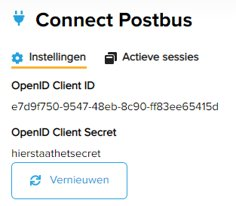
On ANVA Hub, the administrator can create and configure an OpenID client. If you need assistance creating or configuring an OpenID client, you can submit a support ticket to Customer Support here. For use with the Connect Mailbox, we recommend the following:
- Assign the Basic and Mailbox Administrator roles to the OpenID client.
- Assign System access to the OpenID client to use the client credential grant.
- Refresh the secret regularly to promote security.
Token retrieval
1POST /identity/token HTTP/1.1
2Host: api.anva.{{tld}}
3Authorization: Basic {{base64-encoded clientid:clientsecret}}
4Content-Type: application/x-www-form-urlencoded
5scopes=Basic%20P0boxadministrator%20orgCode%3A{{organisatiecode}}&grant_type=client_credentials- Line 1 refers to the endpoint for generating a token based on oAuth 2.0 + OpenID Connect.
- Line 2 contains the domain where {{tld}} is a placeholder for the top-level-domain .cloud for acceptance environment and .io for production environment.
- Line 3 concerns the header of the request. It should contain the Authorization key with the value Basic + a base64 encoded string of the combination of the client id and the client secret.
- Line 5 contains the roles (Basic and PObox administrator) for which the token should be generated. Thus, these roles must have been assigned to the OpenID client by the administrator.
- Line 5 contains the organization code where the OpenID client was created.
Send zip file to Connect PO Box
Request
Below is an example of a request that can be used to deliver a zip file to the Connect PO Box.
1POST /transaction/aplaza HTTP/1.1
2Host: api.anva.{{tld}}
3Content-Type: application/json
4Authorization: Bearer {{jwt}}
5Cache-Control: no-cache
6
7{
8  "data": {
9    "items": [
10      {
11        "message": "{{base64-encoded ZIP-bestand}}"
12      }
13    ]
14  }
15}
Response
The request for uploading a zip file produces another response. Depending on the result of the processing, the http status code and response body are prepared. The most common situations:
- 200 OK
- The zip file and all the files it contains were processed successfully.
- In the body of the response, an id, the file name and status are returned for each file, among other things.
- Status 'complete' means that the file was processed successfully.
- 207 Multi-Status
- The zip file was processed successfully, but some files from the zip file could not be processed.
- The body of the response returns an id, filename and status for each file, among other things.
- At this status, the provider should check which files were not processed successfully. Using the errorMessage, one can find out what caused the unsuccessful processing, such as an unknown mailbox connection number.

