


End-customer app or portal
Introduction
The Contact, Contract, Document and Claim APIs enable the unlocking of an end customer's customer data from ANVA 4/5. These REST/JSON APIs can be used, for example, to provide an app or customer portal with customer data in a secure way.
Customer data
The Contact, Contract, Claim and Document APIs allow access to an end customer's customer data. Access to customer data is only possible based on the end customer's account associated with their customer record. Also, the app or customer portal must be integrated with ANVA Hub's OpenID Connect identity provider, as the end customer must be logged into ANVA Hub to enable retrieval of customer data.
Extensive information on creating and linking an account for an end customer to their customer record can be found in the document "Giving End Customer Access to Relationship Data in Customer Portal" which can be accessed via the Appendices section.
Use of currency
The APIs of this app make it possible to retrieve amounts and numbers from ANVA 4/5 and pass them to another application and/or publish them in an end-customer portal or app. The amounts and numbers retrieved with this API (e.g. for contract and claim) are always sent out without currency indication. This means that the receiving application/supplier is responsible for correctly configuring, using and displaying currency characters and icons.
Giving end customer access
Before an end customer can access customer data, an account must be created by the relationship manager and linked to the appropriate customer record.
Add account for end customer to customer record
Locate the end customer's customer record. This step can be performed by users with the role Relationship Manager.
- Log on to https://hub.anva.io
- Click in the search bar at the top of the screen

- Enter a keyword by which the end customer's customer record can be found.

- In the search result, click on the end customer's client file.

- In the client file, click the Add Account shortcut.

- Enter the e-mail address of the end customer to which the invitation should be sent. If present in the relation data, the e-mail address of the end customer is already pre-filled. It is of course possible to deviate from the pre-filled e-mail address.

- Click Save.
An email is now sent to the end customer at the specified email address. The email contains an invitation to the end customer to perform the account activation process.
Perform account activation process by end customer
The end customer will receive an email invitation to activate their account.
- End customer clicks activation link in email.
- The activation process on ANVA Hub is initiated.
- End customer enters a self-selected password in the New Password and Repeat Password fields.

- End customer clicks Reset password.
- A confirmation appears that the account has been activated.
The end customer's account is now activated. The end customer can use the combination of username (email address) and password to log into the customer portal application.
Login by end customer
First time login by end customer
After activating the account, the end customer can log into the customer portal application. When logging in for the first time, the end customer is asked for permission to share the data with the customer portal application.
- End customer opens customer portal application and login page appears.
- End customer enters their username (email address) and password and presses Login.
- The page appears asking the end customer for permission to share data with the customer portal application.
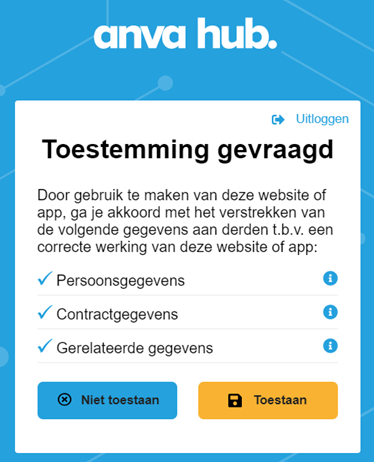
- If the end customer presses Allow, then the customer portal application can retrieve data from the end customer's customer record via ANVA Hub.
Appendix
Customer API Endpoints and Account Creation v1.0.pdf
Technical Documentation
The link to the technical documentation for contact, contract, document and claim api's, are on the left side of the menu.

